Document API mental model
Query a document, identify a target, apply a mutation, and inspect its receipt.
The Document API is the operation contract for reading and changing a SuperDoc document. Browser and headless hosts expose the same operation names and data shapes.
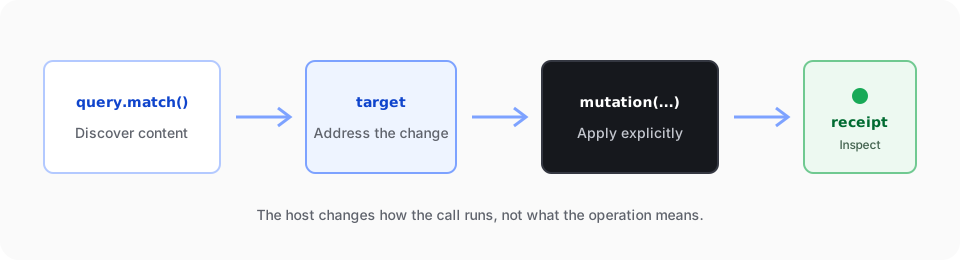
Most workflows follow four steps:
- Query the document.
- Keep the returned address or target.
- Apply a mutation to that target.
- Inspect the mutation receipt.
1. Query
Use doc.query.match(...) to find content by meaning or structure. A query returns document-native references for the next step.
Follow Query document content for a complete browser example and the result fields to keep.
const match = await editor.doc.query.match({
  select: { type: 'text', pattern: 'termination' },
  require: 'first',
});

const result = match.items[0];
if (!result || result.matchKind !== 'text') {
  throw new Error('No matching text found.');
}

const operation = await editor.doc.replace({
  target: result.target,
  text: 'cancellation',
}, { changeMode: 'tracked' });
const match = await doc.query.match({
select: { type: 'text', pattern: 'termination' },
require: 'first',
});
const result = match.items[0];
if (!result || result.matchKind !== 'text') {
throw new Error('No matching text found.');
}
const operation = await doc.replace({
target: result.target,
text: 'cancellation',
changeMode: 'tracked',
});Do not derive mutation locations from rendered DOM nodes or copied text offsets. The DOM can change when layout changes. A Document API result belongs to the document model.
2. Address or target
An address identifies a document location or object. A target describes the content a mutation should affect. Some query results provide a mutation-ready target. Other workflows resolve an address into the target required by the operation.
Keep the target returned for the current document revision. If the document changes first, query again instead of assuming that an old target still points to the same content.
3. Mutate
Pass the target to the operation that makes the change. The target makes the scope explicit. It also lets each host apply the same operation contract without inspecting its UI state.
Tracked-change review follows this shape. doc.trackChanges.list() discovers changes. doc.trackChanges.get() reads one change. doc.trackChanges.decide({ decision, target }) applies a decision to an explicit target.
4. Receipt
A successful mutation returns a receipt that records what the engine applied. Use it to confirm the result and continue from the resolved effects.
Treat the receipt as part of the contract. Do not infer success from a repaint, a changed file size, or the absence of an error.
Runtime shape
Browser calls are Promise-shaped. Other clients expose their own synchronous or asynchronous form. The operation names, inputs, outputs, targets, errors, and receipt meaning stay the same.
This separation is deliberate. The host decides how a call runs. The Document API decides what the call means.
Use the contract in a workflow
Mount an editor
Open a DOCX, make a tracked edit, and export the result in a browser application.
Run a headless operation
Query a DOCX, accept its tracked changes, and save a separate output from Node.js.
Connect code to human review
Create a tracked replacement, review the exact output in the editor, and export the decision.
Reference
The generated Document API reference is derived from the canonical public contract and lists the current operations, inputs, outputs, and failure modes.