Preview and apply mutation plans
Validate several document edits, then apply them together against one document revision.
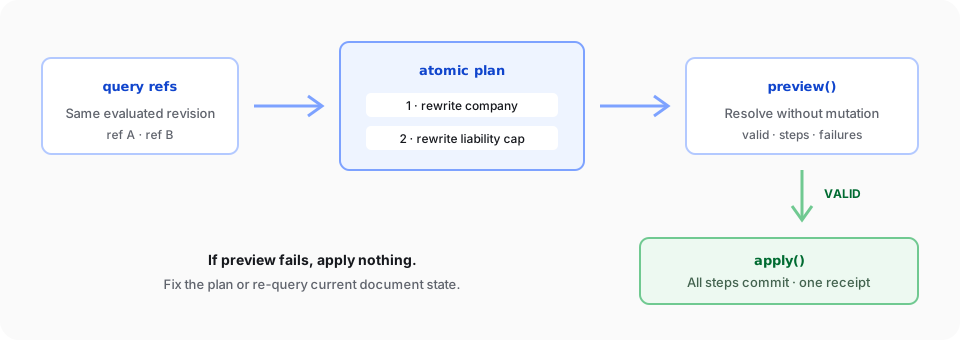
Use a mutation plan when several edits belong to one logical change. A plan resolves every target, previews the combined work without changing the document, and applies valid steps as one atomic transaction.
For one independent replacement or deletion, prefer the direct operations in Replace and delete content.
Run a complete browser example
Create a browser app with an #editor mount element and an explicit container height, as shown in the Editor quickstart. This example expects the tracked-changes fixture at /contract.docx. Its source lives in the docs app and is typechecked against the public v2 browser API:
import { SuperDoc } from 'superdoc';
import 'superdoc/style.css';

const superdoc = new SuperDoc({
  selector: '#editor',
  document: '/contract.docx',
  onReady: async ({ superdoc }) => {
    const doc = superdoc.activeEditor?.doc;
    if (!doc) throw new Error('The active document is unavailable.');

    const [companyResult, liabilityResult] = await Promise.all([
      doc.query.match({
        select: { type: 'text', pattern: 'Amazing' },
        require: 'exactlyOne',
      }),
      doc.query.match({
        select: { type: 'text', pattern: '$500,000' },
        require: 'exactlyOne',
      }),
    ]);

    const company = companyResult.items[0];
    const liability = liabilityResult.items[0];

    if (!company || company.matchKind !== 'text' || !liability || liability.matchKind !== 'text') {
      throw new Error('The expected contract text was not found.');
    }

    if (companyResult.evaluatedRevision !== liabilityResult.evaluatedRevision) {
      throw new Error('The document changed while the plan targets were being collected.');
    }

    const plan = {
      expectedRevision: companyResult.evaluatedRevision,
      atomic: true as const,
      changeMode: 'tracked' as const,
      steps: [
        {
          id: 'rename-company',
          op: 'text.rewrite' as const,
          where: { by: 'ref' as const, ref: company.handle.ref },
          args: { replacement: { text: 'Northstar' } },
        },
        {
          id: 'lower-liability-cap',
          op: 'text.rewrite' as const,
          where: { by: 'ref' as const, ref: liability.handle.ref },
          args: { replacement: { text: '$250,000' } },
        },
      ],
    };

    const preview = await doc.mutations.preview(plan);
    if (!preview.valid) {
      throw new Error(preview.failures?.map((failure) => failure.message).join('; ') ?? 'Plan preview failed.');
    }

    const receipt = await doc.mutations.apply(plan);
    console.log('Applied steps:', receipt.steps);
  },
});

window.addEventListener('beforeunload', () => {
  superdoc.destroy();
});
The example queries both targets before applying any change. It also confirms that both matches came from the same document revision before building the plan.
Build the plan from references
Use item.handle.ref for plan steps. Each ref points to content resolved by query.match(), and expectedRevision binds the plan to the document state that produced those refs.
Every plan requires:
atomic: truechangeMode: 'direct'or'tracked'- A stable, unique
idfor every step - A supported step
op - A
wheretarget for core text/format steps, or explicit nativeargsfor review steps
Check doc.capabilities().planEngine.supportedStepOps before constructing plans dynamically. The generated reference remains authoritative for each step shape.
Mutation plans do not accept a per-call author, including on individual steps. Use separate tracked plain-text doc.insert, doc.delete, or doc.replace calls when edits need different display authors; unlike a plan, those calls are not atomic as a group.
Relocate a discussion and decide revisions together
Applications can explicitly relocate a root comment thread before accepting or rejecting exact revision IDs in one mutation. The application chooses which thread to move and its destination. Ordinary revision decisions retain their default behavior.
const plan = {
  atomic: true,
  changeMode: 'direct',
  expectedRevision: revision,
  steps: [
    {
      id: 'move-discussion',
      op: 'comments.patch',
      args: {
        commentId: rootCommentId,
        target: { kind: 'text', blockId: survivingParagraphId, range: { start: 0, end: 0 } },
      },
    },
    {
      id: 'decide',
      op: 'trackChanges.decide',
      args: {
        decision: 'reject',
        target: { kind: 'ids', ids: revisionIds },
      },
    },
  ],
} satisfies Parameters<typeof doc.mutations.apply>[0];
const preview = await doc.mutations.preview(plan);
if (preview.valid) await doc.mutations.apply(plan);
Review plans support direct edits in the body story. Concrete point/range targets refer to the starting revision; every relocation must precede every decision. Decisions identify whole text revisions through id or ids. Preview validates the complete sequence without changing document bytes, revision, or history. Apply publishes the complete result once and creates one Undo entry; a failed step leaves the original document intact.
Review plans cannot mix core text/format/structural steps. Comment creation, comment metadata changes, Custom XML writes, structural revisions and secondary stories are unsupported. The selected destination must survive every decision. Preview reports unsupported combinations explicitly; do not invent a fallback destination after failure. plan.execute remains stepwise and retains earlier successful edits when a later entry fails.
A grouped revision can include paragraph marks or other structural carriers even when its public type is deletion. Such groups are unsupported by review plans and are rejected before publication. Repeated exact revision IDs are counted and decided once.
Replace a selected range with a locked block content control
V2 supports structural.replace for a nonempty visible-text selection inside one ordinary body paragraph. Supply one block rich-text SDT whose content contains ordinary paragraphs. The operation replaces the selected text, preserves surrounding text, and produces one undoable change. Paragraph and run formatting in the supported fragment is retained through DOCX export and reopen.
const plan = {
  atomic: true,
  changeMode: 'direct',
  steps: [
    {
      id: 'replace-selected-slash',
      op: 'structural.replace',
      where: {
        by: 'target',
        target: {
          kind: 'selection',
          start: { kind: 'text', blockId: paragraphId, offset: 0 },
          end: { kind: 'text', blockId: paragraphId, offset: 1 },
        },
      },
      args: {
        content: {
          kind: 'sdt',
          sdt: {
            scope: 'block',
            type: 'richText',
            tag: 'replacement',
            lock: 'content',
            content: [
              {
                kind: 'paragraph',
                paragraph: {
                  props: { spacing: { line: 30, lineRule: 'exact' } },
                  inlines: [{ kind: 'run', run: { text: 'Replacement content' } }],
                },
              },
            ],
          },
        },
      },
    },
  ],
} satisfies Parameters<typeof doc.mutations.apply>[0];
const preview = await doc.mutations.preview(plan);
if (preview.valid) await doc.mutations.apply(plan);
Exact line spacing uses points: line: 30 serializes as w:line="600" twips. The locked control prevents content editing after creation. Standalone and supported shared browser rooms use the same operation.
This structural replacement must be the only mutating step in its plan. Tracked mode, cross-paragraph targets, nested table/control targets, non-paragraph SDT children, linked assets, placeholder and appearance overrides remain unsupported. Existing paragraph styles may be referenced; this operation does not import new style definitions. Use planEngine.supportedTargets and planEngine.unsupported to discover supported targeting modes and named restrictions, then preview the concrete input. Invalid payloads, targets and revisions fail before mutation.
Preview without changing the document
doc.mutations.preview(plan) resolves targets and validates every step without applying document changes.
Read:
validbefore callingapply()failuresfor the step ID, phase, code, and messagestepsfor the targets each step resolvedevaluatedRevisionfor the state used during preview
A valid preview is still a snapshot. Another writer can change the document before apply, so keep expectedRevision on the plan.
Apply atomically
doc.mutations.apply(plan) commits every step together. If compilation, target resolution, an assertion, or revision validation fails, the plan does not partially apply successful steps.
The returned plan receipt includes the before/after revision, a result for every step, any tracked-change addresses, and timing metadata. Use step results for verification and diagnostics, not for inventing performance claims.
The generated mutations.preview reference and mutations.apply reference list supported steps, limits, outputs, and failure codes.
Commit content-control operations together
V2 also supports doc.plan.execute({ atomic: true, entries }) for supported content-control operations and associated text or formatting edits. Without atomic: true, plans keep their existing stepwise behavior and retain successful entries before a failure.
const result = await doc.plan.execute({
  atomic: true,
  entries: controls.map(({ target }, index) => ({
    operationId: 'contentControls.replaceContent',
    input: { target, content: `Reference ${index + 1}`, overrideContentLock: true },
  })),
});
if (result.failure) throw new Error(result.failure.message);
The atomic route prepares on detached document bytes and commits the supported result once to the active session. It preserves existing history and gives the whole batch one Undo unit. Preparation or commit failure leaves the active document and history unchanged. It is bounded to 1,000 entries in one existing body, header or footer story. Cross-story batches and operations that change the package graph are refused unchanged.
Local plans support content-control creation, unwrap, deletion, property patching, lock changes and content replacement; plain text insertion/replacement/deletion; inline formatting; and existing mutations.apply operations. Each operation retains its own support boundaries. For example, tracked lock changes, inline retagging/deletion and replacement of a newly tracked inline insertion may be refused. Atomic execution does not make an unsupported tracked representation valid: it discards the complete prepared proposal on refusal.
Shared rooms support direct control/formatting batches within one story when the batch preserves document identities. Structural creation/deletion, tracked atomic proposals and cross-story shared batches are refused unchanged. A shared batch is one backend commit and one local Undo unit; peer history remains local to each peer.
captureAs and capture references may connect entries inside an atomic plan. Atomic captures do not persist across calls and captureReturns is unavailable, because preparation can produce revision-bound handles. Read fresh results after a successful commit. Failure expectations and per-entry history exclusion are also unavailable in this route. Hosts without atomic support refuse the opt-in before executing entries.