How SuperDoc works
Understand how SuperDoc keeps OOXML as the document source across browser and headless workflows.
SuperDoc reads, renders, edits, and writes DOCX files through their OOXML parts. It does not convert a DOCX to HTML and reconstruct the file after editing. The browser Editor and supported headless clients use the same document engine and Document API contract.
Try the browser Editor
Select the tracked change, then accept or reject it.
The sample editor loads as this demo enters view. The rest of the article stays lightweight.
Follow the document through the engine
- Open. The engine parses content, styles, relationships, media, headers, footers, and the other OOXML parts into editable document state.
- Render. The layout engine paginates that state. The browser painter projects the resolved pages into DOM. The DOM is an output, not the document format.
- Edit. Editor input and headless operations update document state. The Document API defines queries, targets, mutations, and receipts.
- Write. Save and export write the changes back into the OOXML package instead of rebuilding a DOCX from HTML.
This is the no-conversion boundary: OOXML remains the source of document meaning from open through export.
Choose an execution surface
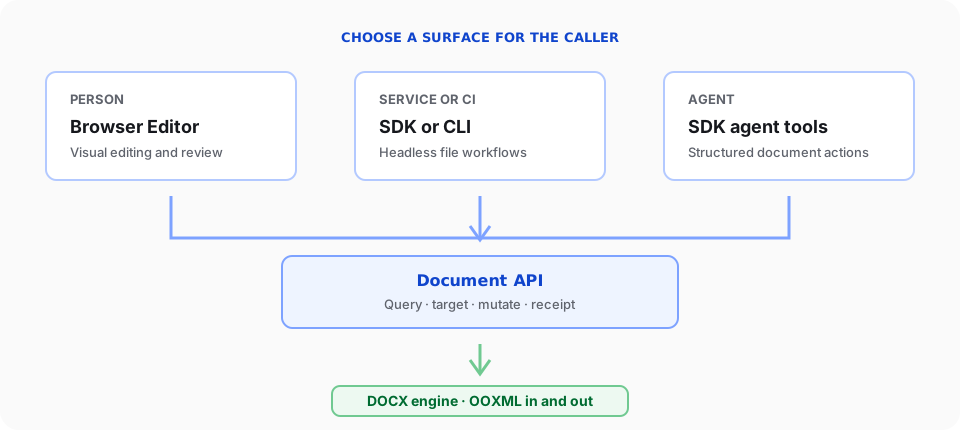
| Caller | Surface | What the surface owns | Start with |
|---|---|---|---|
| Person | Browser Editor | Rendering, input, selection, navigation, and review UI | Editor overview |
| Service or CI | Node.js, Python, CLI | Sessions, files, batches, retries, and process failures | Agents & automation |
| Agent | SDK agent tools | Tool definitions, prompts, dispatch, and review handoff | Build an agent |
| Any code | Document API | Structured reads, mutations, receipts, and errors | Document API mental model |
Headless code does not have a toolbar, viewport, DOM selection, or visual review surface. Choose the surface by who or what drives the document.
Use one operation contract
The Document API is an operation contract, not another runtime. The Editor and supported headless clients expose the same operation names and data shapes.
| Need | Operation families |
|---|---|
| Read and discover | Queries, extraction, document info, Markdown, and HTML views |
| Edit and review | Insert, replace, delete, format, comments, tracked changes, history, and diffing |
| Structure and media | Sections, tables, headers, footers, page setup, images, and alternative text |
| Word data and controls | Content controls, bookmarks, fields, footnotes, custom XML, and protection |
| Produce output | DOCX export and template application |
Support can vary by runtime, document state, and mutation mode. Check doc.capabilities() before presenting an operation, then inspect its receipt or error. Use the generated reference for the complete operation and field inventory.