Receipts and errors
Check capabilities, inspect mutation results, and recover safely from stale document state.
Treat every Document API mutation result as part of the operation contract. A successful receipt confirms what the engine applied. A failure receipt or rejected call explains why the workflow must stop, re-query, or change its request.
Successful review-aware mutations may include appliedChangeMode: 'direct' | 'tracked'. This reports the mode in which document content was committed. It can differ from the requested changeMode and from the Editor's documentMode. The field is absent on failures, dry runs, no-op successes, and operations that do not author reviewable content. For mutations.apply, each committed step can report its mode; the plan reports one only when all committed steps have the same mode.
An edit folded into the same author's existing insertion reports tracked because the content remains under review. When a content edit also writes a style or numbering definition, the field describes the content edit.
1. Check capabilities before acting
Capabilities describe the current document runtime. Check the operation and the requested mutation mode before presenting or running a workflow:
const capabilities = await doc.capabilities();
const replaceCapability = capabilities.operations.replace;

if (!replaceCapability.available) {
  const reasons = replaceCapability.reasons?.join(', ') ?? 'No reason reported';
  throw new Error(`Replace is unavailable: ${reasons}`);
}

if (!replaceCapability.tracked) {
  throw new Error('This document runtime cannot record replacements as tracked changes.');
}
Each operation capability reports available, tracked, and dryRun. Namespace-level flags such as capabilities.global.trackChanges.enabled describe broader runtime support.
A capability check is a snapshot, not a guarantee. Document state, permissions, or targets can change before the mutation runs, so always inspect the eventual result too.
2. Handle both failure paths
Mutations can fail in two ways:
- The call returns a receipt with
success: falseandfailure.code. - The call rejects before applying anything, for example when input validation or a revision guard fails. These errors expose a machine-readable
codeand a message.
function readErrorCode(error: unknown): string | undefined {
  if (typeof error !== 'object' || error === null || !('code' in error)) return;
  return typeof error.code === 'string' ? error.code : undefined;
}

const result = await doc.query.match({
  select: { type: 'text', pattern: 'Amazing' },
  require: 'exactlyOne',
});
const match = result.items[0];

if (!match || match.matchKind !== 'text') {
  throw new Error('The company name was not found.');
}

try {
  const receipt = await doc.replace(
    { target: match.target, text: 'Northstar' },
    { changeMode: 'tracked', expectedRevision: result.evaluatedRevision },
  );

  if (!receipt.success) {
    console.error(receipt.failure?.code, receipt.failure?.message);
    return;
  }

  console.log('Mutation applied:', receipt);
} catch (error) {
  console.error(readErrorCode(error), error);
}
Do not treat the absence of an exception as success. Read receipt.success before saving, exporting, or starting a dependent operation.
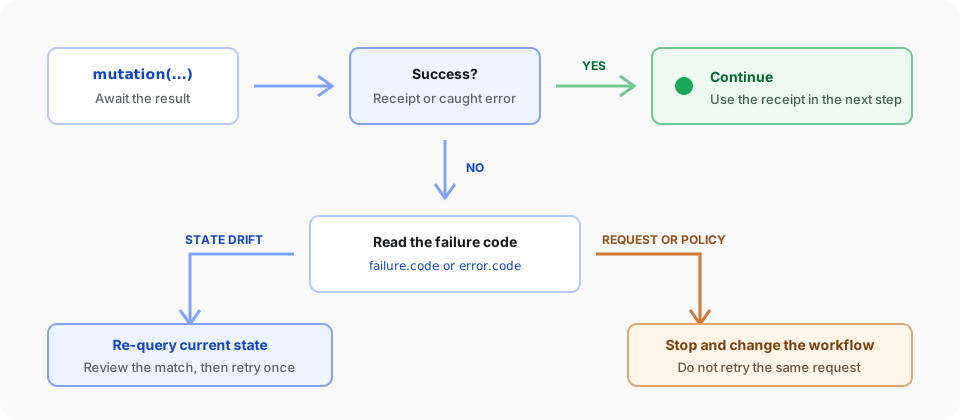
3. Choose recovery from the code
Use the code to select a bounded recovery path:
| Code family | Meaning | Action |
|---|---|---|
REVISION_MISMATCH, STALE_REVISION, ADDRESS_STALE, TARGET_NOT_FOUND | The document or target changed | Re-query current state, review the new match, and retry once |
NO_OP | The request would not change the document | Stop and verify whether the desired state already exists |
CAPABILITY_UNAVAILABLE, CAPABILITY_UNSUPPORTED | The current runtime cannot perform the request | Change the mode, operation, or runtime; do not retry unchanged |
PERMISSION_DENIED | Document policy prevents the mutation | Keep the document unchanged and resolve authorization or protection first |
INVALID_INPUT, INVALID_TARGET | The request shape or target is invalid | Fix the request; do not retry the same payload |
INTERNAL_ERROR | The runtime could not complete the operation safely | Record the code and context, then stop the workflow |
Not every operation can return every code. Use the generated operation reference when implementing operation-specific recovery.
Read a structured refusal reason
Known V2 text-range refusals add a stable failure.details.reason. Use the
public helper and types from superdoc/ui (also exported by
@superdoc/document-api) instead of parsing the human-readable message:
import { getDocumentApiRejectionReason } from 'superdoc/ui';

const reason = getDocumentApiRejectionReason(receipt.failure?.details);
if (reason === 'text-range-in-sdt') {
  // Ask the caller to choose editable content.
}| Reason | Identified refusal |
|---|---|
text-range-in-sdt | The refused text range intersects a locked or non-editable content control. |
text-range-in-field | The refused range intersects unsupported field-backed content. |
text-range-in-unsupported-tracked-wrapper | The refused range intersects an unsupported tracked wrapper. |
content-control-unsupported-inline-structure | Inline content-control creation cannot wrap or replace the selected structure. |
content-control-shared-run-boundary | Inline content-control creation cannot resolve the caret inside a shared run; choose a supported run boundary. |
DocumentApiRejectionReason, TextRangeRejectionReason,
ContentControlCreationRejectionReason, and DocumentApiRejectionDetails describe
these values. Existing top-level codes and messages remain unchanged, including
CAPABILITY_UNAVAILABLE for these creation refusals. This metadata does not
change which edits are permitted.
Read check.failure.details from capabilities.check, or receipt.failure.details
from a mutation receipt. The CLI-backed Node SDK promotes a failed receipt to
SuperDocCliError: its public failure is nested at error.details.failure, so
pass error.details.failure.details to the helper after narrowing the unknown
error and details objects. The SDK outer code can differ from the nested failure
code. Document-host SDK calls that return receipts use the receipt path.
A reason may be absent when the failure is unrelated or the runtime cannot
identify one of these exact contexts. For example, rich HTML/Markdown replacement
may return INVALID_TARGET / paste-target-unsupported where plain-text
replacement identifies an SDT or tracked wrapper. capabilities.check accepts
rich inputs only; it cannot preflight the plain-text replacement shape. Preserve
that distinction. Supported edits, including wrapping existing text across a
proofing marker, remain supported; supplying replacement content follows a
different creation path and can still refuse at that marker.
The helper returns undefined for absent, unrelated, or unrecognized details.
Continue to handle the existing failure code in that case.
4. Retry state drift once
When a revision or target is stale, run the original query again and review its current result before retrying. Limit automatic retries to one. A repeated state-drift failure usually means another writer is active or the workflow is targeting unstable content.
Never remove expectedRevision just to make a retry pass. That guard prevents a valid operation from applying to an unintended document state.
5. Cancel a browser call before you retry it
On the browser worker Document API, doc.insert, doc.mutations.apply, and doc.extract accept a host-side signal or timeoutMs. A timer in your application only stops your wait. It does not cancel the engine call and it does not roll back a mutation.
| Outcome | What happened | Retry |
|---|---|---|
| The call resolves with a success receipt | The mutation committed | Do not send that mutation again |
error.code === 'CANCELLED' | The command did not start. The document is unchanged | The same call is safe to retry |
error.code === 'INDETERMINATE' | The call stopped after the command may have started, or the document was replaced / the editor closed | Read the current document, or open the editor again, before retrying |
An already-aborted signal, or timeoutMs: 0, finishes as CANCELLED and does not change the document. Aborting or expiring a deadline after the worker has started the command does not undo it. That call finishes as INDETERMINATE so the application stops waiting; a later receipt is not returned on that promise.
SDK extract timeout and layout-readiness stay separate controls. This contract covers the browser worker calls above.
Continue with Replace and delete content for a complete revision-guarded example. The generated Document API reference lists each operation's receipt and failure codes.