Choose your editor interface
Decide whether to use SuperDoc's built-in UI, configure it, or build your own controls.
Every Editor integration uses the same DOCX engine, document lifecycle, and public Document API. The interface decision determines who owns the controls around the document.
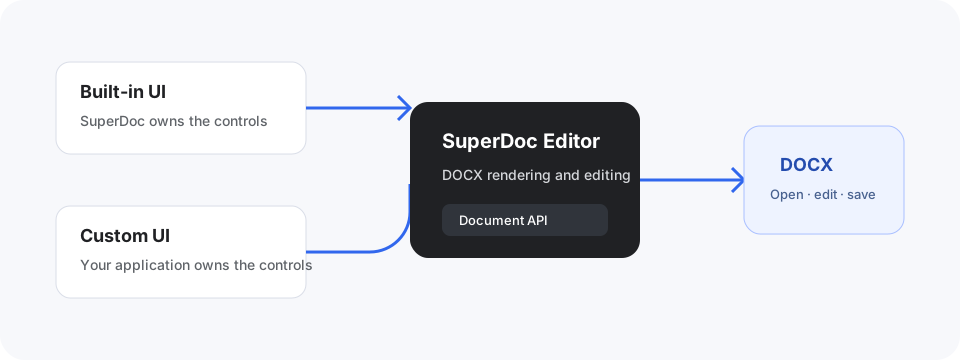
Compare the options
| Approach | Choose it when | Your application owns | SuperDoc owns |
|---|---|---|---|
| Built-in UI | You need a complete editing experience quickly | Product shell, document access, workflow | Toolbar, editing surface, review controls, responsive editor behavior |
| Configured built-in UI | The built-in experience fits, but some controls should be hidden or rearranged | Product shell and toolbar configuration | Control behavior, command state, editing surface |
| Custom UI | Your product needs its own layout, controls, or workflow | Toolbar, panels, interaction design, application state | Document rendering, editing, public command and state controller |
Start with the built-in UI unless product requirements clearly need custom controls. It provides the shortest path to a complete, accessible editing workflow and helps the team learn which interactions actually need customization.
Use the built-in UI
Choose the built-in UI for document editors, review screens, and internal workflows where the standard editing experience already fits.
You can still control the document mode, current user, modules, theme, file lifecycle, and export behavior. Configuring the built-in UI is usually a smaller and safer step than rebuilding every control.
Build a custom UI
Choose a custom UI when the surrounding product experience is part of the differentiation. Examples include a focused contract approval screen, a form-like document workflow, or controls that must match an established application design system.
superdoc/ui exposes a framework-neutral controller. superdoc/ui/react adds React providers and hooks over that controller. Both stay on public v2 surfaces and operate against the same active Editor and Document API.
Understand the custom UI model.
Keep the lifecycle the same
Whichever interface you choose:
- Create a
SuperDoceditor with a DOCX and a visible container. - Wait for
onReadybefore binding document-dependent controls. - Read state and run commands through public surfaces.
- Inspect receipts for programmatic changes.
- Export the DOCX and call
editor.destroy()when finished. That tears downeditor.uiwith it, so destroy a controller yourself only if you built it withcreateSuperDocUI().
Switching interface strategies should not change how the document is opened, represented, or saved. It changes which layer renders and owns the controls.
For the shortest complete path, continue with the Editor quickstart. To own the controls, start with Custom UI controller setup.